Showing posts with label extension. Show all posts

Ginger Extension for Chrome Adds Contextual Spelling And Grammar Correction


Ginger, the contextual spelling and grammar correction software is now available as a free Chrome Extension. If you are not familiar with Ginger click here. The software can correct spelling and grammar for any written text in the Chrome web browser. Ginger is great for people that struggle with spelling or people who are learning English. To download Ginger for Chrome click here.


You have read this article blind / chrome app / contextual spell check / dyslexia / extension / free / Ginger / google chrome / grammar checker / no cost / Special Education with the title extension. You can bookmark this page URL http://fieldecho.blogspot.com/2012/05/ginger-extension-for-chrome-adds.html. Thanks!

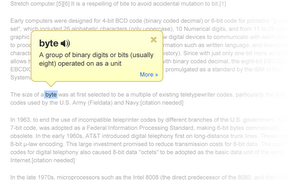
Google Dictionary Defines Any Word on the Web


Google Dictionary is a free extension available for Google Chrome. To download the extension click here. Once downloaded simply double click on any word on a web page to view its definition or hear the word read aloud. Google Dictionary is perfect for quickly looking up unfamiliar words. To learn about other Chrome extensions click here.
You have read this article accessibility / assistive tech / assistive technology / at / Chrome / define / definition / dictionary / dyslexia / extension / fast / free / Google / google chrome / look up / no cost / one click / webstore with the title extension. You can bookmark this page URL http://fieldecho.blogspot.com/2011/12/google-dictionary-defines-any-word-on.html. Thanks!

Speech Recognition Extensions For Chrome


 The Chrome browser by Google is well liked by many users. To download Chrome click here. Now there are many extensions that allow you to speech your text into any webpage. This feature is enabled for Google search by default in Chrome. To read more about Google voice search click here. With an extension such as Voice Search you can add voice search to any text box on any page. To download the Voice Search extension click here. Voice input is very helpful for people who have trouble spelling or for people who have trouble using the keyboard. To watch a video about Google voice search click read more below.


You have read this article apple / assistive technology / bad speller / Chrome / download / dyslexia / extension / free / Google / mac / mac os x lion / PC / speech button / speech recognition / speech-to-text / spelling / voice input / windows with the title extension. You can bookmark this page URL http://fieldecho.blogspot.com/2011/08/speech-recognition-extensions-for-chrome.html. Thanks!

Speakit! Chrome Extension Reads any Text Aloud


SpeakIt! is an extension for Google chrome that can read the web to you. The extension is a free download from the Chrome Web store. SpeakIt! reads selected text aloud. To activate the speech highlight text that you wish to read, press the SpeakIt! logo in the top right and click the play button. To pause the play back press the pause button in the top right. SpeakIt! is a very simple text to speech converter. SpeakIt! is only available for Google Chrome Users.
You have read this article assistive technology / Chrome / chrome web store / disability / dyslexia / extension / free / Google / great / read the web / speakit / speech recognition / text-to-speech with the title extension. You can bookmark this page URL http://fieldecho.blogspot.com/2011/07/speakit-chrome-extension-reads-any-text.html. Thanks!