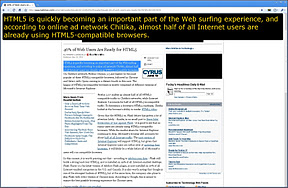
ChromeVis is a simple Chrome extension for users with low vision. ChromeVis is simple to use and has many customization options. To use ChromeVis highlight the text you want magnified and then click on the ChromeVis icon in the top right of your Chrome window. To customize the appearance of ChromeVis right click on its icon and select options. To download ChromeVis for free click here.
You have read this article accessibility /
assistive tech /
assistive technology /
at /
Chrome /
chromevis /
free /
Google /
hidden feature /
low cost /
low vision /
mac /
quick /
simple /
tips and tricks /
windows
with the title low vision. You can bookmark this page URL http://fieldecho.blogspot.com/2011/12/chromevis-free-tool-for-chrome-users.html. Thanks!
Microsoft Word has a hidden text-to-speech button built in. To access add the text-to-speech button to the quick access tool bar click on the down arrow in the top left corner of the screen. Next click on more commands and then click on all commands from the drop down menu. Finally click on speak from the list and then press add. To use the text-to-speech feature select the text you wish to have read and click on the text-to-speech button you just added to the top left corner of the screen. The text will be read allowed instantly. Click the button again to stop the text-to-speech. Watch the video above to learn more. Click read more below for step by step instructions.
You have read this article accessibility /
assistive technology /
at /
blind /
blindness /
dyslexia /
free /
hidden feature /
low vision /
microsoft word /
one click /
quick /
read aloud /
step by step /
text-to-speech /
tip /
trick
with the title low vision. You can bookmark this page URL http://fieldecho.blogspot.com/2011/12/add-quick-text-to-speech-button-to.html. Thanks!
Oregon is testing the iPad to assist disabled voters and allow them to vote privately. Some Oregon voters that are unable to vote using paper ballets will be able to vote using the iPad in tomorrow's election as part of a pilot program. Voters with visual impairments, physical disabilities, dyslexia and other disabilities that make voting with paper ballets difficult will be able to vote using a custom iPad app. The app will have the ability to enlarge font size, improve contrast and read text aloud to assist disabled voters. The app also works with VoiceOver for improved accessibility. Blind voters will be able to connect their Braille displays to the iPad via Bluetooth in order to read the ballets. Users that use Bluetooth accessories will be able to connect them to the iPad in order to vote. The app will allow disabled voters to make their selections privately without election officials knowing which candidates the voter selected. Election officials made the following comments about voter privacy.
"Some people want to vote independently, and they're the ones that we're talking to."
Laws require people with disabilities to have equal access and privacy while voting.
You have read this article A5 /
apple /
apple inc. /
assistive tech /
assistive technology /
at /
blind /
Bluetooth /
braille /
disabled voters /
dyslexia /
iPad /
ipad 2 /
low vision /
oregon /
voters /
voters rights /
voting
with the title low vision. You can bookmark this page URL http://fieldecho.blogspot.com/2011/11/oregon-using-ipad-to-assist-disabled.html. Thanks!
Bookshare'sRead2Go app was recently updated with more features and better performance. If you are unfamiliar with Bookshare click here. The Read2Go app allows Bookshare members to download books directly their iPad, iPhone or iPod Touch. Once books are downloaded you can read them using built in text-to-speech. For more on Read2Go click here and here. One new feature in the update enables the app to handle larger books including text books. Another useful feature allows the audio to keep reading even if your device is locked or Read2Go is in the background. Yet another feature enables schools to transfer books to Read2Go via iTunes. Read2Go is available in the App Store for $19.99. Read2Go is a must have app for Bookshare members who wanted a portable way to read their books. To read the release notes click read more below.
Notes from Read2Go iTunes page.
What's New in Version 1.0.1.1
• Playback while locked – allows you to continue Read2Go audio while your screen is locked. Turn on Playback while locked in Audio Settings. • Background playback – allows you to continue reading with Read2Go audio when you exit the app. You can use the audio controls to pause and resume playback by left swiping the multitasking bar. This feature does not apply when using VoiceOver to read the content of books and periodicals. • Improved stability – book reading is more stable, particularly for larger books. Further enhancements are planned for the next release. • Page-by-page content loading – allows you to reduce memory usage and improve performance. Users can still revert back to section level loading. Turn Display by Page on and off in Visual Settings. Playback while locked – continue reading with Read2Go audio while screen is locked. • Transfer books from computer – Organizational accounts can now transfer books, particularly books with images, via iTunes. • Auto Play – allows you to set books to automatically play upon opening them via Read2Go audio. This setting is available only from the main application Settings and not from the book settings. • Improved operability with VoiceOver - among the many fixes, you can now navigate to any section, page or bookmark and begin reading via VoiceOver. We are evaluating other improvements for future releases.
• Fix for audio issues with iPad mute switch.
You have read this article app /
benetech /
blind /
bookshare.org /
dyslexia /
Google /
iOS /
iPad /
ipad 2 /
iPhone /
iphone 5 leaked /
iPod touch /
itouch /
low vision /
Read2Go /
text-to-speech /
update
with the title low vision. You can bookmark this page URL http://fieldecho.blogspot.com/2011/09/read2go-app-gets-updated.html. Thanks!
ZoomReader is a combination of a text-to-speech reader, OCR (optical character recognition) reader and zoom magnifier. The app is compatible with the iPhone 4. ZoomReader can help people with many disabilities and challenges including low vision, blindness and dyslexia. The app uses the iPhone 4's camera to magnify printed text up to four times its original size to allow people with low vision to better see the text. ZoomReader can also change the contrast when the iPhone is held over the text to make it easier to read. ZoomReader also includes a lighting fast OCR feature that converts printed text into electronic text that can be read aloud. If you are unfamiliar with OCR click here. Once the text is converted to a digital format it can be read aloud by an included text-to-speech voice.
One tip for improving the OCR quality is to turn on the camera flash. You can also add new text-to-speech voices for $2.99. The app has many customization options that allow you to change the appearance of the reading experience. Another killer feature is the voice activation powered by Nuance. To turn on speech activation touch the microphone in the top left. The voice activation feature allows you to take pictures and zoom in on text with the sound of your voice. For example you can say "take picture" to snap a picture of a document. To learn more about Nuance's accurate speech-to-text engine click here. The ZoomReader app is perfect for people with low vision, dyslexia or blindness. The app is $19.99 in the iTunes app store.
Two lucky winners can win this app for free by checking back on this site for giveaway information and promo codes. Watch my video review above for a demonstration. Click read more below to see screen shots and how to videos. Do not forget to check the Assistive Technology Blog in the next few days for giveaway details.
You have read this article app /
assistive technology /
fast /
free /
giveaway /
intel reader /
intel reader alternative /
iTunes /
low vision /
OCR /
ocr app /
promo codes /
speech recognition /
speech-to-text /
text-to-speech /
zoom reader /
zoomreader
with the title low vision. You can bookmark this page URL http://fieldecho.blogspot.com/2011/08/zoomreader-review-giveaway.html. Thanks!
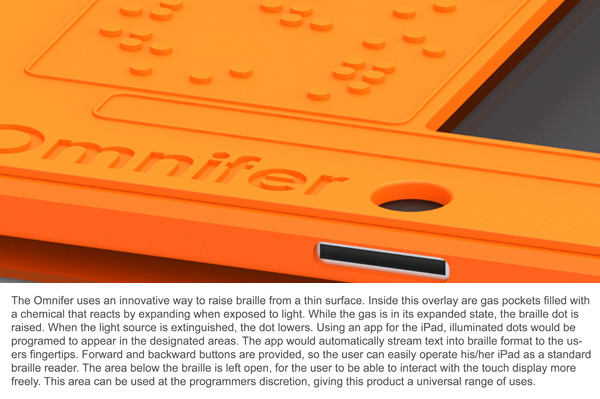
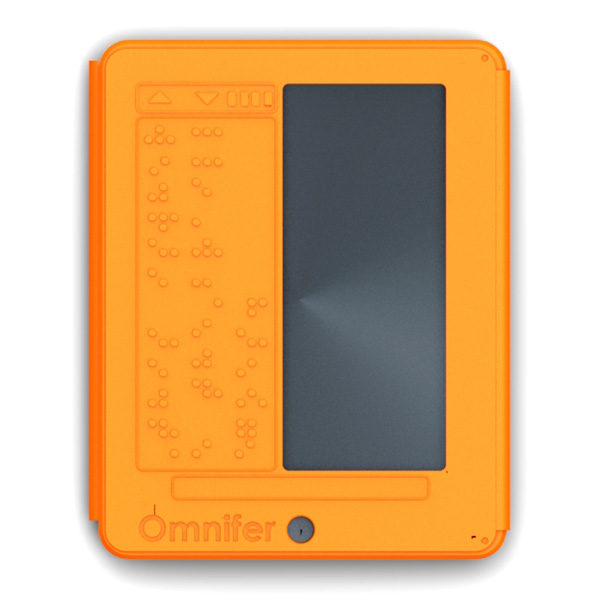
The iPad has many accessibility features built into the software. iOS includes VoiceOver, white on black and zoom. To learn more about iOS accessibility click here,here and here. A new concept case has a built in refreshable Braille display. The Braille display is very thin and does not add much wight. To learn more about thin refreshable Braille displays click here. The Braille display covers half of the screen for non-sighted users this is not a problem. The Braille iPad case is not for sale as of this post. To see more images of the Braille iPad case click read more below.
You have read this article accessibility /
apple /
apple inc. ios 5 /
assistive technolgy /
blindness /
Bluetooth /
braille ipad /
case /
fast /
features /
images /
iOS /
iPad /
light /
low vision /
refreshable braille display /
thin /
VoiceOver
with the title low vision. You can bookmark this page URL http://fieldecho.blogspot.com/2011/08/braille-ipad-case.html. Thanks!
AccessText is a way that higher education students with print disabilities can get accessible books. AccessText provides textbooks to higher education students free of charge to the student. But the institution must pay $500 membership fee. AccessText is similar to Bookshare but Bookshare also has novels and periodicals. Also Bookshare has a free text-to-speech software but with AccessText you must use your own text-to-speech software. Eight major publishers have teamed up to provide books through AccessText. AccessText is another great tool for getting accessible material for higher education students with a print disability.
You have read this article accessible textbooks /
AccessText /
Accesstext network /
assistive technology /
at /
blind /
bookshare /
bookshare.org /
dyslexia /
Google /
low vision /
publishers /
Read2Go /
text books /
textbooks
with the title low vision. You can bookmark this page URL http://fieldecho.blogspot.com/2011/07/accesstext-helps-students-get.html. Thanks!
For students who have low vision taking notes can be challenging if not impossible. A group of students from Arizona State University have come up with a solution. The solution gave them first place in the 2011 Imagine Cup sponsored by Microsoft. Their solution, called Note-Taker, can magnify the board and display a live view of the board on a tablet computer. Note-Taker is not available for sale at the time of this post. For people with low vision Note-Taker offers hope and should be on the market some time in the near future.
You have read this article arizona state university /
Google /
great solution /
imagine cup /
low vision /
Magnifier /
microsoft /
Note-Taker /
taking notes /
winners
with the title low vision. You can bookmark this page URL http://fieldecho.blogspot.com/2011/07/imagine-cup-idea-can-help-students-with.html. Thanks!